Wikipedia & Linterweb

17 November 2009

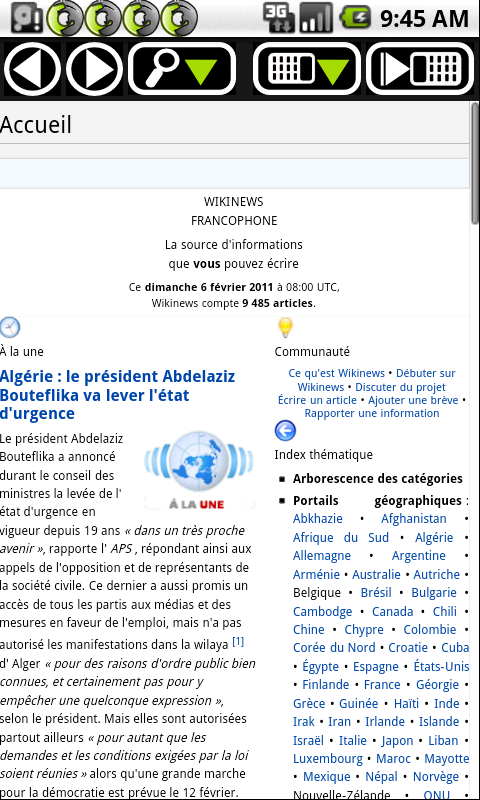
wikiwix.mobi, a search engine in your pocket.

Filed under: wikiwix — Matthieu @ 18:05

I use Wikipedia quite a lot. Well, I mean… really a lot! Most of the time I can survive without Wikipedia. But I may sometimes feel as well quite disarmed without it. I need it a lot for my work, I use it also just for my own pleasure… Then I find it of course very convenient to be able to browse Wikipedia on my mobile phone. Anywhere, anytime…

Well, people like me may be interested by the fact that our company, Linterweb, has just released a mobile version of its semantic Wikipedia search engine, Wikiwix.

It is quite simply called wikiwix.mobi.

Like Wikiwix, it gives only results out of Wikipedia.

This mobile version is available at the address http://wikiwix.mobi/. Just give it a try!

So, we hope you will enjoy wikiwix.mobi, and of course enjoy Wikipedia,

Take care, Matthieu.


Linterweb is a web company that, for now several years, has been developing various Wikipedia oriented programs, including:

  • Wikiwix, a semantic web search engine that gives only results out of the databases of the Wikimedia Foundation’s projects; My Wikiwix, your own search engine for your own website; wikiwix.mobi, a mobile version of Wikiwix;
  • Okawix, the offline Wikipedia browser free of copyrights and free of charge that allows you to read offline the articles of the various Wikimedia Foundation projects, as well as archives of your own website;
  • a DVD of around 2000 articles from the English speaking Wikipedia; a USB flash drive that contains the version 0.7 of the English speaking Wikipedia;

14 October 2009

Okawix is a free software.

Filed under: Non classé — Matthieu @ 12:05

Hello everybody,

Recently we (I mean the people who work at Linterweb) have had the surprise to read here and there in a couple of comments or articles that Okawix would regrettably not be a free software. How and why this has been written, is for us great mystery.

Therefore, we’d like to make it completely clear that Okawix IS an absolutely and entirely free software… As free as a bird!!

Okawix, the off-line Wikipedia reader that has been developed by our company, Linterweb, was released officially on the 13th of July 2009, while Okawix’ source code was released on the 9th of the same month; that is, before Okawix’ publication…

More accurately, Okawix is available under the GPL version 2 License, (i.e., among other things, the software is free of copyright and free of charge, and anyone interested may view the source code at the address http://sourceforge.net/projects/okawix/ and edit it).

Okawix uses the Mozilla technologies (XUL / Javascript, XPCOM components written in C++) and can be run on the popular Linux operating system, as well as on the Windows or MacOS operating systems.

Okawix can be downloaded for free from Internet at the following address: http://www.okawix.com/. If your connection is slow, our website allows you too to buy USB flash drives with on it Okawix and all articles of the various projects of the Wikimedia Foundation, in one or several languages of your choice (all of Wikipedia, all of Wikisource, … with the pictures).

It was worth to be said, wasn’t it?

So, have much free fun with our free Okawix software :-) take care, Matthieu.

5 October 2009

Various news of Okawix.

Filed under: okawix — Matthieu @ 16:32

Dear all,

We’ve got several news for you about Okawix, the off-line Wikipedia reader that was developed by the web company Linterweb, and whose search engine is our other program Wikiwix.

First of all, Linterweb is going once again to collaborate with the English speaking Wikipedia 1.0 community. The Wikipedia 1.0 projects plan to implement content review, to produce a filtered snapshot of the English speaking Wikipedia, to publish a core set of articles thanks to a selection based on a combination of importance and quality. This project is still under way. A first 0.5 version containing a collection of almost 2,000 core articles has been released in April 2007. Well… The news is that the next version, the version 0.7, containing this time around 31,000 articles, is about to be released in the form of a .okawix archive, so that you will be able to download the .okawix archive of the version 0.7 through the use of the Okawix software, or directly from our Okawix.com website. Then the software Okawix will allow you to read the articles of the Wikipedia 0.7 off-line, or, among other things, to find specific articles with the help of our integrated Wikiwix search engine, …

Secondly, I’m happy to announce that new languages have been added to the Okawix software. It was of course already possible to get the contents of the various Wikimedia projects in all the available languages of the Wikimedia, that is, about 253 different languages (!). But the user interface, that until now was only available in French, German, Spanish and English, will be from now on available in the twelve following languages: not any more only French, German, Spanish and English, but in addition Finnish, Hungarian, Indonesian, Dutch, Polish, Russian, Slovak, Japanese. By the way, we’d like to express a huge thank you! to the members of the translatewiki.net community for all the work they have done for those user interface translations!!!

Furthermore, I’m glad to announce that a documentation has been added to the Okawix software, too. Unfortunately, this documentation is so far only available in French, but it will be soon available in more languages!

Last but not least, you’ll note that several bugs have been corrected, including a quite annoying one that caused Okawix to crash during the download of big .okawix archives (e.g. the archive file of the English speaking Wikipedia…).

Well, if you would like to learn more about Okawix, we encourage you to visit and read our blog, especially the article “Introduction to Okawix“.

Enjoy your time with Okawix!

Yours sincerely , Matthieu.

27 August 2009

Okawix translation will be supported by Translatewiki.net.

Filed under: okawix — Matthieu @ 12:11

Linterweb is pleased to announce that its offline Wikipedia browser Okawix has just been added to the list of the projects whose translation is supported by translatewiki.net, a localisation platform for open source projects.

This means that, from now on, Okawix translation will be taken in charge by the members of the translatewiki.net community.

We’d like to thank very much Nike and Siebrand, who run the translatewiki.net project, as well as the numerous members of the translatewiki.net community (among others Michawiki,Fryed-peach, Hosiryuhosi, Naudefj, Umherirrender, Bennylin, ‎Александр Сигачёв, Toliño, Kiranmayee, Purodha, Fulup, Cedric31) who have  startedtwo days ago to deal with the translation in already more than 10 different languages.

If you wish to help, don’t hesitate to go onto the home page of the Okawix translation project, that you will find here: http://translatewiki.net/wiki/Translating:Okawix.

14 August 2009

Introduction to Okawix (Wikipedia in off-line mode).

Filed under: okawix — Matthieu @ 13:35

Okawix lets you download all of Wikipedia articles, with or without the pictures, so that you can read them off-line.

With Okawix you will be able to browse the articles of Wikipedia, as well as those of its sister projects (Wikisource, Wiktionary, Wikiquote, Wikibooks, …) in 253 languages.

Okawix offers you also the possibility to perform searches on these articles through the search engine Wikiwix, produced by the software company Linterweb.

Okawix, developed by the same company, Linterweb, is a software initially designed to read the articles of the various projects of the Wikimedia Foundation (Wikipedia, Wikibooks, Wikiversity, Wiktionary, Wikiquote, Wikispecies, Wikinews, Wikisource, …; but Okawix is in reality able to read any HTML document).

One of its characteristics is that it allows you to store effortlessly all articles of a given Wikimedia project (Wikipedia, …) on any data storage medium (e.g. the hard drive of your computer, a CD, or a USB flash drive), and then to browse the articles off-line (that is, once you have copied the articles of a project from, for instance, Internet, or from a CD, you can see these articles without being connected to the Internet).

Furthermore, you can choose to copy the articles with or without the pictures (in order to reduce the  space required for the storage of the articles).

Okawix is distributed under the GNU General Public License (ie, among other things, the software is free, and anyone interested may view the source code at the address http://sourceforge.net/projects/okawix/ and edit it).

Okawix uses the Mozilla technologies (XUL / Javascript, XPCOM components written in C++) and can be run on the popular Linux operating system, as well as on the Windows or MacOS operating systems.

Okawix can be downloaded for free from Internet at the following address: http://www.okawix.com/. If your connection is slow, our website allows you too to buy USB flash drives with on it Okawix and all articles of the various projects of the Wikimedia Foundation, in one or several languages of your choice (all of Wikipedia, all of Wikisource, … with the pictures).

3 August 2009

An article of MakeUseOf.com about Wikiwix!!

Filed under: wikiwix — Matthieu @ 10:50

We’re very grateful to Abhijeet and Kaly from MakeUseOf.com for their nice review of our application Wikiwix on their excellent website. They write that Wikiwix is the “Ultimate Wikipedia Search Engine”. Isn’t that cool!?

(let’s just note that Wikiwix allows searches in all Wikipedia languages, that is around 253 languages)

Again thank you very, very, very much to MakeUseOf.com!

Matthieu.

30 July 2009

Wikiwix’s Atlas: Unity makes it stronger.

Filed under: wikiwix — Matthieu @ 4:32

One for all, all for one. The combination of Google Maps, Wikipedia, and Wikiwix is what the firm Linterweb brings you with Atlas.

Atlas uses Wikiwix, the semantic search engine programmed by Linterweb, to enhance Google Maps with resources extracted from Wikipedia, the well known on-line encyclopaedia.

Capture d\'écran d\'Atlas en action.

Whether you use it for browsing around Google Maps, or for preparing for your business or pleasure visit, you’ll find out that Atlas is a very worthy companion and figure out two main ways to use its functionality.

Let’s assume, for instance, that you perform on Wikiwix a search on Rouen, a city in Normandy, in France. Wikiwix sends you back a list of results ranked according to their estimated relevance. In our example, the result at the top of the list is the link to the English language article about Rouen. For each result, Wikiwix provides you some more related information (in particular, Associated categories, Close places, Map). By clicking on Map, you’re then directed to the so called Atlas functionality of Wikiwix: a Google map of Rouen appears and you will notice some blue and red location pins, also called markers. If you click on one of the pins, a small window opens, containing additional Wikipedia information about the location. For instance, in our example, if you click on the red marker in the middle of the map of Rouen, the small window will display information about Rouen stemming from the Wikipedia, as well as a thumbnail picture.

You can also access this enhanced map by going directly to Atlas and entering a place name into the search box.

Atlas, as well as Wikiwix, are available in many languages.

Just give it a try, and please don’t hesitate to send us your feedback, it is valued and will be considered as we work to improve Atlas.

Thanks in advance, Matthieu.

4 July 2009

More about the timelines

Filed under: timeline — Matthieu @ 16:16

Hey everybody,

Since the end of May, the firm Linterweb offers tools that allow a new innovative way of visualizing in the shape of timelines information of the Wikipedia.

So far, you will find two useful types of timelines.
- the first one, the generalist timeline, shows the most important personalities of a given time on a timeline at the scale of about two centuries. The personalities are represented by a segment beginning at the birth date of the personality, up to his death date. Above the segment is written the name of the personality. You can easily scroll on the timeline with the mouse. If you click on the name of any personality, a tooltip pops up, which displays a small picture of the personality, as well as the beginning of the Wikipedia biography. By, within this tooltip, clicking on the name of the personality, you open his Wikipedia article. And by clicking on another link you focus the timeline on the time period of the personality.
In the upper right corner of the web page, a small form allows to reach directly the time period for a given year or personality.
- The second type of timeline, instead of displaying only information from the Wikipedia, allows to combine it with information of Wikinews. There are actually two timelines. The first one, at the scale of a few (ten) days and focused, by default, on the current date, displays the events found in Wikinews for these days. The second timeline is actually made of three timelines. The three are on a scale of about 50 years. The three show events that occurred the same day as the day of today (by default ; you can of course select another date) throughout those 50 years. The first of the three timelines shows the births that occurred the same day, the second timeline deals with the deaths, and the third one with the important events.
A JavaScript tag is available too, that you can copy-paste onto your own website, so that you can display these timelines on your website.

These two tools, already available free of use on the website of the web company Linterweb, are part of a set of web applications programmed by Linterweb, including a research engine that performs its search exclusively amongst the articles of the Wikimedia foundation, as well as a DVD of around 2000 articles from the English speaking Wikipedia.

Powered by WordPress